WANT TO START SELLING YOUR DESIGNS ONLINE — WITHOUT INVENTORY, SHIPPING OR YOUR OWN WEBSITE?
Discover how to build a Zazzle store from the ground up with the products, niches, design tools and SEO strategies to help you stop guessing what to create and start building your store with a plan.
The Zazzle Store Blueprint gives you the step-by-step resources to get started — even if you've never sold online before.
WHAT IF YOU COULD SELL PRODUCTS ONLINE WITHOUT ACTUALLY MAKING THE PRODUCTS PHYSICALLY?
Zazzle is a print-on-demand marketplace that allows you to create designs for products people are already shopping for — from invitations and stationery to gifts, apparel, home products and more.
Leverage a simple, automated, scalable way to sell online…
And grow an extra income stream working a few hours a week…
From anywhere in the world (you just need a laptop)...
You create the designs.
Zazzle creates the physical product.
Zazzle handles the transaction and shipping.
You earn a royalty when one of your products sells.
No boxes of inventory sitting in your home.
No packing orders.
No trips to the post office.
No need to build your own ecommerce website.
But there's one catch...
Simply opening a Zazzle store and uploading random products doesn't mean customers are going to find them.
That's where The Zazzle Blueprint comes in.
THE PROBLEM ISN'T GETTING STARTED, IT'S WHAT TO DO NEXT.
When you first discover Zazzle, it can seem simple:
Create a store. Make some products. Add some keywords. Wait for customers.
But then the questions start...
-> What products should I create?
-> What niches should I focus on?
-> How should I design the product?
-> What should I put in my title and tags?
-> How do I give my listings the best chance of being found?
-> Did I even set up my store correctly?
And suddenly, what looked simple starts feeling overwhelming.
We created the Zazzle Store Blueprint to take away that guesswork.
Now the six things you're currently listing have a reason to exist.
That's important.
INTRODUCING THE ZAZZLE STORE BLUEPRINT
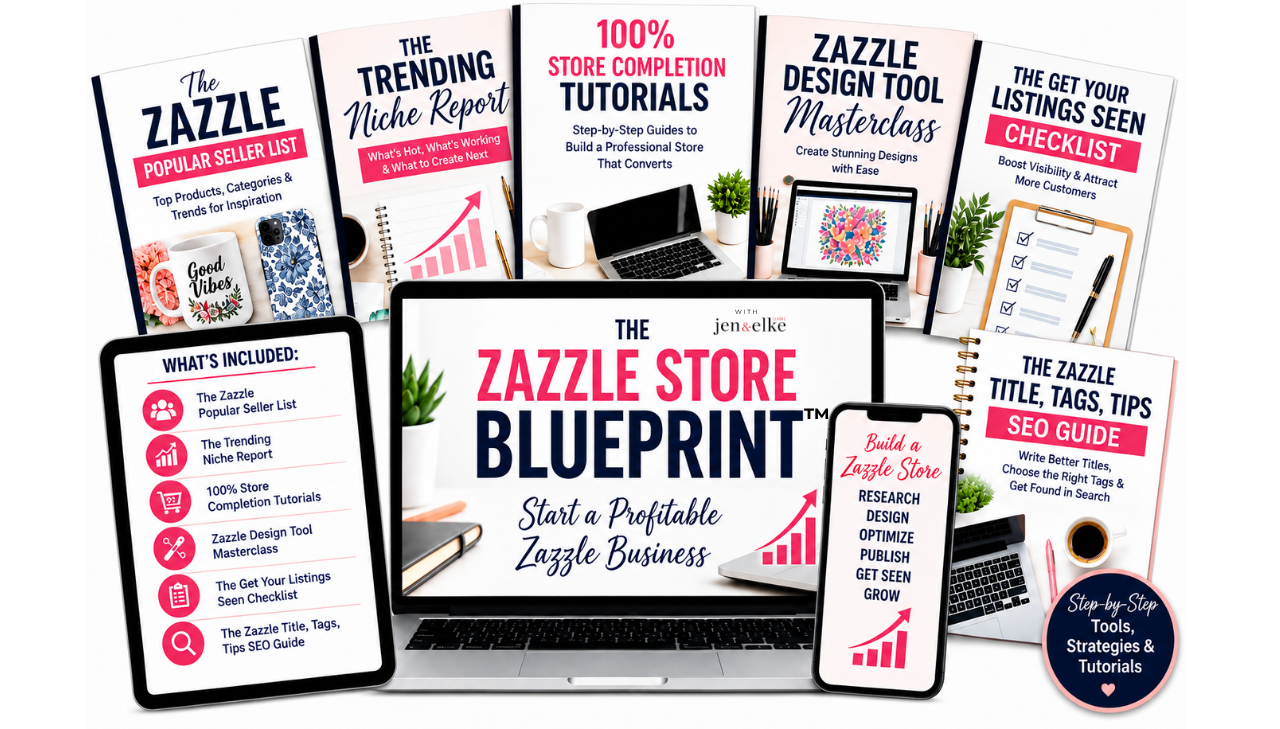
Six PROVEN resources designed to help you build your Zazzle store with strategy from the beginning.
WHAT'S INCLUDED:
100% Store Completion Tutorials:
Start with the right foundation.
Set up your Zazzle store with the key foundational components to get Zazzle algorithms to show your products in the Zazzle marketplace.
Zazzle Design Tool Masterclass:
You don't have to be a professional designer to get started.
Learn how to use Zazzle's own design tools to create intentional, customer-friendly products and understand the important details that can make the difference between a product that looks good on screen and one that's actually ready for customers to personalize and purchase - even if you’re not a designer or not creative.
The Get Your Listings Seen Checklist:
Stop wondering if you forgot something.
Use this simple checklist every time you publish a product to make sure you've covered the important listing elements that help customers — and Zazzle — understand what your product is about, and make sure you don't miss a single thing needed to ensure maximum listing visibility.
The Zazzle Title, Tags, Tips SEO Guide:
Take the mystery out of Zazzle SEO.
If you want to get your listings seen, this indepth guide of Dos and Don'ts specific for SEO on Zazzle is exactly what you need when creating your titles and tags, so you're giving your products a better opportunity to appear when the right customer is searching.
The Zazzle Popular Seller List:
You don't have to choose from thousands of Zazzle products blindly.
We've done the research for you.
Use our curated list of consistently popular Zazzle product types to help narrow your focus and make more strategic decisions about where to spend your time.
The Trending Niche Report:
Stop asking yourself, "But what should I make?"
Get access the top selling niches, top selling products for each niche with top SEO keywords, and niche-specific design themes to help you save time to get your listings seen and sold. You will go from "I have no idea what to create" into an actionable starting point.

WHO ARE JEN & ELKE?
We're Jen and Elke Clarke, a mother-daughter team who have spent years building successful businesses on Zazzle and teaching other creators how to approach Zazzle as a business — not just a place to randomly upload designs.
We've learned through years of experience that success on Zazzle isn't about creating more random products. It's about understanding what customers are looking for, choosing products intentionally, creating for specific niches, and making it easier for the right customers to discover what you've made.
The Zazzle Store Blueprint brings some of the foundational strategies and resources we use and teach into one simple place — so you don't have to spend years figuring everything out through trial and error.
We have both been on teh Zazzle platform since 2008, and coaches since 2017.